

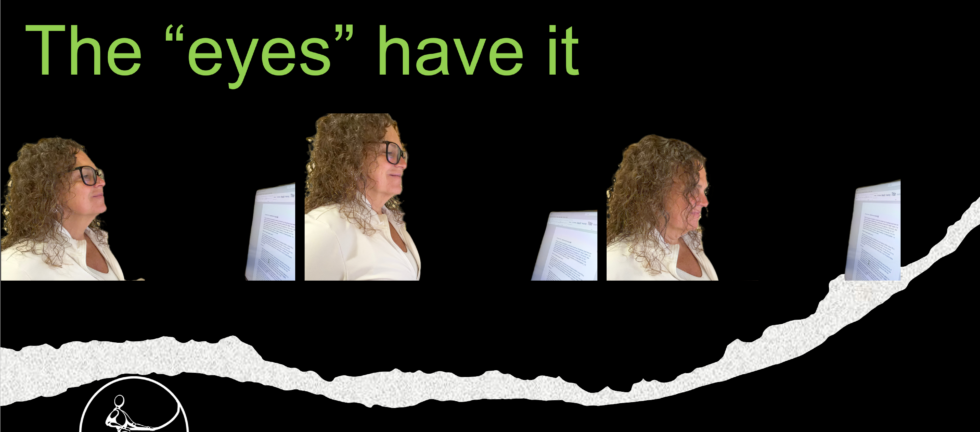
October 1 is “International Day of Older Persons”, according to the United Nations. As I age, I have gained a new perspective on eyewear and computer use. My particular visual needs are typically met by two options: progressive lenses, or contact lenses combined with “cheater” readers. (I’ve always been near-sighted, and I have an astigmatism, but now I’m far-sighted too.) Truth be told, I often choose a third option, which is no lenses at all; I can see my screen if I’m close enough, but I can’t identify a colleague across the room, and I certainly can’t drive anywhere.
On days when I am in the office all day, particularly if I will be on a webcam, I prefer the aesthetic of not wearing glasses – my colleagues can see my eyes without the glare on the lenses. The photo on the far right above shows what that choice does to my posture at the computer. (I’m aware that the camera angle is not especially flattering, thanks in part to the “older person” effects of gravity, but the topic seemed to call for a real-life demonstration. Sigh…)
What do I have against progressive lenses?
They make a lot of sense, in some respects. Scientifically known as Progressive Addition Lenses (PALs), they are line-free multifocals that gradually shift in optical power from top to bottom. The lens corrects distance vision at the top, intermediate (or middle) vision in the narrow center, and near vision at the very bottom. When you look toward the horizon, you use the top part of the lenses. A computer screen requires the middle section. And you read a hand-held phone, nutrition label, or book, through the bottom part. Seems logical.
My issues are:
- While wearing my progressives at the computer, I have to tip my neck way back to see the top; the left-most photo above, shows this posture. If I lower my screen as low as I can, my neck posture is not as extreme while viewing the top of the screen, but I still feel like my head is tipped back a bit. The middle photo shows this. Note that some workstations do not allow the screen to be adjusted this low. Progressives simply don’t offer a tall enough “window” to view the entire screen without bending my neck.
- If I go for a hike in the woods or climb down an unfamiliar set of stairs wearing these glasses, I’m prone to misjudging my footing and slipping, because the bottom part of the lenses magnifies everything at the bottom of my field of view. People do get used to this, I’m told.
I often recommend computer glasses during an ergonomics assessment, particularly for those who are experiencing neck pain, eye discomfort, or headaches. These allow you to view an entire well-placed screen without moving the neck up and down. Computer glasses are only useful at the computer – the user needs another set handy for distance.
What about “occupational lenses”?
You can also ask your optometrists about “occupational” or “workspace” progressive lenses. Unlike everyday progressives, occupational lenses eliminate the distance zone at the top. Instead, they dedicate the upper 60% of the lens to intermediate computer vision and the bottom portion to reading. This expands your intermediate field of view slightly, allowing you to scan a monitor with a more natural neck posture, and still read a message on your phone. Some occupational progressives also offer a bit of distance correction at the top of the lens. I like to remind people that they can ONLY view the screen comfortably through the part of the lens that is corrected for middle distance. If you were to paint over the “near” and “far” section of a regular progressive lens, it would become obvious that the relatively small area of “middle distance” vision requires much more neck movement than occupational progressives, computer glasses, or no glasses at all.
Confirm your viewing distance before you visit your optometrist
When perusing the research, I was reminded that, “Key factors for successful occupational correction include precise working distance assessment, consideration of task duration, postural requirements, and evaluation of the workplace lighting environment.” My optometrist has never asked me how far away my screens are; perhaps she assumes that I can adjust the screen position for my comfort. While this is often the case, many people do not have much control over how far away their screens are. If this is true for you, measure the distance between your screens and your eyes before you visit your optometrist, so you can ensure that your prescribed lenses are perfect for your eyes.
Choosing this path means keeping a separate pair of glasses for driving and hiking. You will still have to contend with screen glare on your lenses during Teams and Zoom calls unless you opt for an anti-reflective coating. But your neck, your spine, and your musculoskeletal health will absolutely thank you.
More reading
American Optometric Association. Computer vision syndrome. aoa.org
Canadian Standards Association (2024) CSA Z412:24 Office ergonomics — An application standard for workplace ergonomics https://www.csagroup.org/store/product/CSA_Z412%3A24/?gad_source=1&gad_campaignid=45916328&gbraid=0AAAAAD8BY9Y3xyNrjmtFZKrrW3VyQ0qbw&gclid=CjwKCAjwoOjVBhArEiwAUwDak-FVgDgvbuQPetCH6vmv3VM1B422R-Rs8r1FSadvFwCTxu6Z8lIf5xoCwjoQAvD_BwE
Hansraj, K. K. (2014). Assessment of stresses in the cervical spine caused by posture and position of the head. Surgical Technology International, 25, 277–279. https://pubmed.ncbi.nlm.nih.gov/32033372/
Heus, P, Verbeek, J., and C. Tikka. (2018) Optical correction of refractive error for preventing and treating eye symptoms in computer users. Cochrane Library. https://www.cochranelibrary.com/cdsr/doi/10.1002/14651858.CD009877.pub2/full
IOT Lenses. (2025, April 14). Understanding computer vision syndrome: A guide to therapeutic lens options. https://iotlenses.com/blog/understanding-computer-vision-syndrome.html
Rosenfield, M. (2021). Computer vision syndrome in presbyopic digital device users: Progressive addition lenses versus occupational designs. Ophthalmic and Physiological Optics, 41(4), 664–673. https://onlinelibrary.wiley.com/doi/full/10.1111/opo.12832
Mota, N., and S. Arya (2025). Optimizing occupational near vision: Evidence-based approaches to prescribing spectacle for workplace. Journal of Ocular Sciences and Ophthalmology, 6(1). https://academicstrive.com/JOSO/JOSO180065.pdf